How To Troubleshoot Pixel Fold Inner Screen Protector Peeling?
Your Pixel Fold’s inner screen protector starts peeling at the edges. It happens sooner than you expect, sometimes within hours of setup. You’re not alone in this frustrating situation.
Many Pixel Fold owners face this exact problem. The good news is you can take steps to manage it. The bad news? You cannot simply remove and replace it yourself.
This guide walks you through what to do when peeling starts. We’ll cover simple fixes you can try right away, like pressing down loose edges and smoothing out air bubbles. You’ll also learn what mistakes to avoid, including why removing the protector yourself can void your warranty.
In a Nutshell
- Press it down gently. If you spot peeling at the edges, push the protector back into place. Use a clean, soft cloth for this.
- Remove air bubbles carefully. Push bubbles toward the nearest edge. Work slowly to avoid making things worse.
- Never remove the protector yourself. This pre-installed layer is not user removable. Taking it off voids your warranty right away.
- Watch for center bubbling. Peeling at the edges is one thing. But bubbling in the middle of the screen means it’s time to call for help.
- Avoid dust and sand near the fold. Fine particles work their way under the protector. Keep your phone’s hinge area clean always.
- Stop using the inner screen if damage spreads. A compromised protector can’t protect your display properly. Continued use may cause bigger problems.
- Contact an authorized service center for real fixes. Home fixes are only temporary. Professional repair is the only lasting solution for serious peeling.
Understanding the Pixel Fold’s Inner Screen Protector
The inner screen protector on your Pixel Fold is a thin layer of TPU material bonded directly to your display. Google applies this protector during manufacturing, and it’s designed to stay on your phone for approximately 7 years. Think of it as part of your phone’s defense system against scratches and minor impacts.
This protector serves a specific purpose. It shields your foldable display from daily wear and tear. The material is transparent, so you won’t notice it during normal use. However, it’s not like traditional screen protectors you can buy separately and apply yourself.
Understanding what makes this protector different is important. The factory installation means it’s permanently attached to your screen. Removing it voids your warranty and can damage the display underneath. Google doesn’t intend for users to take it off or replace it independently.
Peeling typically happens early, sometimes within hours of unboxing your device. This usually signals a manufacturing defect rather than normal wear. When the edges start lifting, air can get trapped underneath, creating bubbles that spread across the surface.
The protector’s lifespan depends on how you treat your phone. Exposure to heat, moisture, and dust can weaken the adhesive bond. Sand and fine particles are particularly problematic because they work their way under the edges and cause separation.
Knowing these facts helps you understand why home repairs are limited. You can temporarily press bubbles down, but permanent solutions require professional help. Google’s service centers have the proper tools and replacement protectors for lasting fixes. Attempting removal yourself creates more damage than the original peeling caused.
Why the Inner Screen Protector Peels
Your Pixel Fold’s inner screen protector peels for several specific reasons. Understanding these causes helps you prevent further damage and know when professional help is needed.
Adhesive degradation happens when the factory bond between the TPU protector and your display weakens over time. This is especially common in the first few days after setup. Temperature changes, humidity shifts, and normal use all stress this bond. The adhesive can fail unevenly, causing peeling to start at one corner or edge.
Dust and debris get trapped under the protector during manufacturing or setup. Even tiny particles of sand or lint create small gaps. These gaps expand as you use your phone. The protector lifts away from the display surface at these weak points. Once peeling starts in one spot, it spreads quickly.
Manufacturing defects account for many early peeling cases. Some units leave the factory with incomplete adhesive coverage. Others have slight surface contamination that prevents proper bonding. These defects become obvious within hours of normal use.
Pressure and flexing from opening and closing your Pixel Fold puts stress on the protector. The inner screen flexes slightly with each fold cycle. This constant movement can separate the protector from the display, especially if the adhesive was already weak.
Moisture exposure weakens the TPU adhesive layer. Even brief contact with water or high humidity can damage the bond. This is why peeling often happens faster in humid climates.
The key point is this: peeling is usually a defect, not normal wear. Your protector should stay bonded for years under normal conditions. Early peeling signals that something went wrong during manufacturing or setup. This is why professional service is your best option for lasting results.
Step-by-Step: How To Fix Minor Peeling and Bubbling
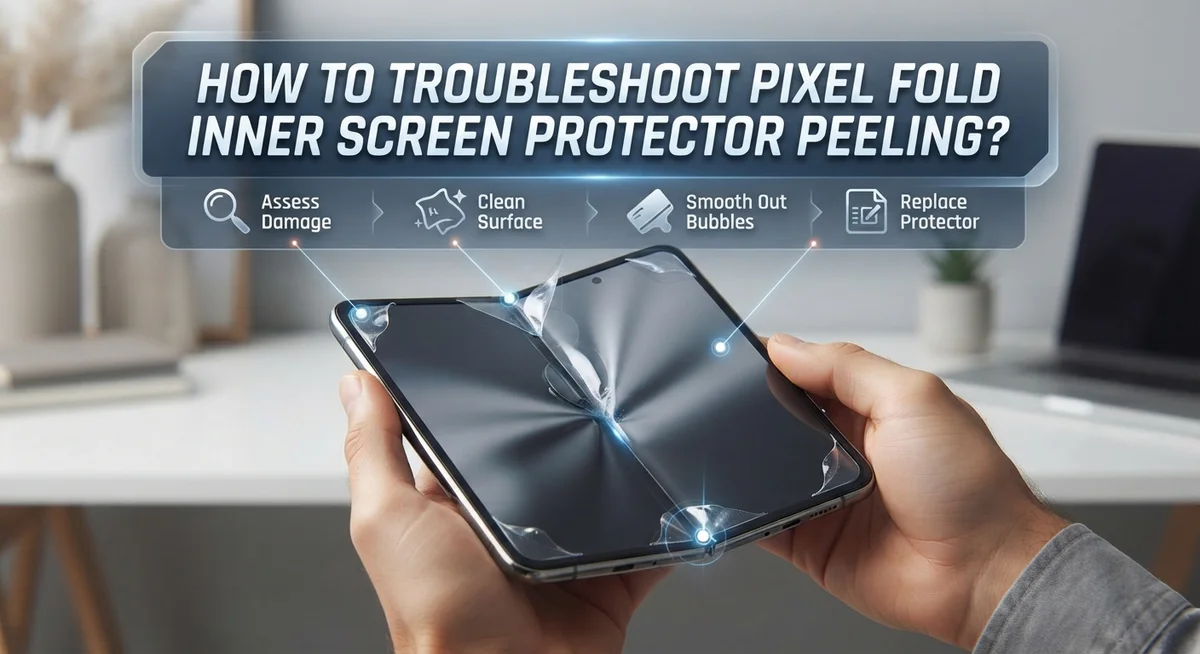
Start by assessing how bad the peeling is. Minor peeling means the protector lifts slightly at the edges but stays mostly attached. Bubbling means air pockets formed under the surface. Both are fixable at home, but only temporarily.
First, clean your hands thoroughly. Dust and oils make the problem worse. Gently press the peeling area back down using light, steady pressure from your finger. Move slowly from the lifted edge toward the center. Don’t rush this step.
Next, push air bubbles toward the nearest edge. Use your fingertip to guide bubbles outward. Apply gentle pressure and work methodically. Bubbles near the fold crease need extra care since that area flexes constantly. Move them away from the center of the screen.
Let the protector settle for several hours after pressing. Don’t use the inner screen during this time. The adhesive needs time to re bond with the display.
Check the results after waiting. If peeling stopped and bubbles disappeared, you’ve succeeded with a temporary fix. The protector should feel smooth again.
Important: this fix only works for minor issues. If peeling returns within days, bubbling spreads to the center, or damage covers more than one small area, stop attempting home repairs. Continued use with a compromised protector risks display damage.
Keep the inner screen clean and dry while waiting. Avoid extreme temperature changes. Don’t fold and unfold your device repeatedly during the settling period.
If the problem persists after pressing, contact an authorized service center. Professionals have better tools and replacement options. Waiting too long makes damage worse and may cost more to repair.
Daily Habits That Prevent Further Peeling
Your daily habits play a huge role in preventing your Pixel Fold’s inner screen protector from peeling further. Start by keeping your hands clean before you touch the device. Dirt and oils transfer to your screen and weaken the adhesive bond underneath the protector.
Avoid opening and closing your Pixel Fold excessively throughout the day. Each fold creates pressure on the protector edges. The more you flex the device, the more stress builds up on the TPU material. Try to limit unnecessary folding when possible.
Keep moisture away from your inner screen at all costs. Don’t use your phone in humid bathrooms or near water sources. Moisture seeps under the protector and degrades the adhesive. Wipe your hands dry before handling the device.
Store your Pixel Fold in a clean, dry environment when not in use. Avoid placing it on dusty surfaces or in pockets with lint. Sand and fine particles get trapped under a peeling protector and cause more damage.
Never press or poke at peeling areas repeatedly. Constant touching spreads the peeling further and introduces more debris underneath. Let the protector settle between checks.
Minimize screen contact on the inner display if peeling has started. Using the screen puts additional strain on the weakened protector. Save heavy tasks for your outer screen instead.
Keep your device away from extreme temperatures. Heat and cold affect TPU material flexibility and weaken adhesive bonds. Store your phone at room temperature when possible.
If you notice new peeling developing, stop using the inner screen immediately and contact an authorized service center. Continuing use with an active peeling protector risks permanent display damage that costs more to repair.
Mistakes To Avoid When Dealing With Peeling
When your Pixel Fold’s inner screen protector starts peeling, certain mistakes can make the problem worse. Understanding what NOT to do is just as important as knowing what to do.
Never attempt to remove the protector yourself. The factory applied TPU layer is not designed for user removal. Taking it off voids your warranty immediately and leaves your display vulnerable to damage. Google does not support DIY removal, and doing so eliminates any repair options you might have.
Don’t keep using your inner screen if peeling is active. Continued use puts extra pressure on the weakened adhesive. Each time you open and close your Pixel Fold, the protector stretches further. This accelerates bubbling and spreads damage across a larger area.
Avoid repeatedly pressing or poking at peeling edges. While gentle pressing helps with minor bubbles, constant touching makes things worse. Your fingers introduce oils and moisture that weaken the bond further. Let the protector rest after one attempt to press bubbles down.
Don’t delay contacting an authorized service center if bubbling persists. Waiting gives the peeling time to spread toward the center of your screen. Once it reaches the middle, professional replacement becomes your only real option.
Never expose your device to moisture while the protector is compromised. Water seeps under peeling areas and damages the display beneath. Keep your Pixel Fold away from humid environments and never use it near water.
Don’t store your device in extreme temperatures. Heat and cold stress the adhesive further. Room temperature storage is best while you arrange professional service.
When To Contact Google or an Authorized Service Center
Your Pixel Fold’s inner screen protector needs professional help in specific situations. Know when to reach out to Google or an authorized service center. This prevents further damage and protects your warranty.
Contact Google or an authorized service center immediately if bubbling spreads to the center of your screen. The center area is critical for display function. Peeling that reaches this zone requires professional replacement, not home fixes.
Reach out if peeling returns within a few days after you press it down. This indicates a deeper adhesion problem. The protector may have a manufacturing defect that temporary pressing cannot fix.
Contact a service center if bubbling persists after you’ve waited several hours and pressed gently. Persistent bubbling means the protector won’t reseal properly. Continuing to use your device risks further separation.
Stop using your inner screen and seek service if peeling worsens or spreads rapidly. Active peeling that grows larger suggests the protector is failing. Using the screen while this happens creates more stress on the damaged area.
Visit an authorized service center if moisture gets under the protector. Water or humidity trapped beneath the TPU layer causes permanent damage. This situation requires professional intervention.
Schedule service if you notice new peeling developing in different areas. Multiple peeling spots suggest a systemic issue rather than a single defect. Only professional replacement solves this problem.
Bring your device to an authorized service center with proof of purchase if your Pixel Fold is still under warranty. Google covers defective screen protectors during the warranty period. Authorized technicians have proper tools and replacement protectors on hand. They can safely handle your device without voiding your coverage.
What To Expect From Professional Repair or Replacement
When your Pixel Fold’s inner screen protector has persistent peeling issues, professional repair becomes your best option. Google and authorized service centers handle these cases regularly, and understanding what happens during the process helps you prepare.
Professional technicians assess the damage first. They examine how far the peeling has spread and whether moisture entered underneath. This inspection determines whether a simple reapplication works or if full replacement is necessary. The evaluation takes just a few minutes but gives you clarity on what’s needed.
Replacement of the inner screen protector happens in a controlled environment. Technicians remove the compromised TPU layer carefully and apply a fresh factory protector. This process requires specialized equipment to ensure proper adhesion and bubble elimination. The work typically completes within one to two hours, depending on service center volume.
Warranty coverage applies to manufacturing defects. If your protector peeled within the first few weeks of normal use, Google usually covers replacement at no cost. Bring your original receipt and device documentation to speed up the process. Service centers verify your purchase date before proceeding.
During your visit, ask technicians about preventive care. They can recommend specific habits that reduce peeling risk going forward. Many centers provide guidance on humidity levels and storage conditions that protect your device.
Turnaround times vary by location. Some authorized centers complete work same day, while others need 24 to 48 hours. Ask about loaner devices or extended hours if you need your Pixel Fold urgently. Always request a receipt documenting what was replaced and any warranty extensions provided.
Signs You Should Stop Using the Inner Screen Immediately
Your Pixel Fold’s inner screen protector sends clear warning signs when it needs immediate attention. Recognizing these signals helps you avoid further damage to your device.
Active peeling that spreads rapidly is your first red flag. If the protector lifts away from the screen faster each day, stop using the inner screen right now. Continued use pushes the peeling further and can trap debris underneath.
Large air bubbles in the center of your screen mean professional help is necessary. Small bubbles near the edges sometimes settle on their own, but center bubbles indicate deeper separation. These bubbles grow larger when you touch them repeatedly.
Visible moisture or discoloration under the protector requires immediate action. Water or condensation trapped beneath the TPU layer can damage your display permanently. Do not attempt to dry it yourself or press it down harder.
Peeling that returns within days after you press it down shows the protector cannot reattach properly. This suggests a manufacturing defect rather than a temporary bubble. Repeated attempts to fix it yourself waste time and worsen the problem.
Rough or sticky edges along the peeling area indicate the adhesive has failed completely. These rough spots catch dust and dirt, making the situation worse. Your device needs professional attention immediately.
Sensitivity or responsiveness issues on the inner screen often accompany serious peeling. If your screen stops responding normally or feels different to touch, the protector separation has affected the display underneath.
Stop using your inner screen the moment you notice any of these signs. Contact an authorized service center immediately. Continuing to use a compromised protector risks permanent screen damage that extends beyond simple protector replacement.
Final Thoughts
Peeling on your Pixel Fold inner screen protector can feel frustrating. But most cases have simple fixes. Quick action makes a big difference.
Start with gentle pressing. Push out air bubbles from the center outward. This solves many minor peeling issues right away.
Never remove the protector yourself. It is not user-removable and pulling it off voids your warranty. Google designed this TPU layer to last around seven years.
Watch how your screen behaves over the next few hours. If peeling returns or bubbling spreads, that signals a bigger problem. Your device needs professional attention at that point.
Keep the fold area clean always. Sand, dirt, and fine particles cause damage over time. This simple habit prevents many future headaches.
Avoid using the inner screen if the protector looks compromised. Continuing to use a damaged screen can make things worse. It may also affect touch response and screen clarity.
Remember this key fact: peeling is a defect, not a normal part of using your phone. You should not accept it as routine wear. Reach out to Google or an authorized service center when problems persist.
Home fixes only work as temporary solutions. Pressing down bubbles buys you time. But it does not replace proper professional repair for serious cases.
Your Pixel Fold represents a real investment. Treating peeling issues quickly protects that investment. It also keeps your inner screen working properly for years ahead.
Stay alert, act fast, and trust the professionals when needed. This approach keeps your foldable device in top shape. Simple awareness now saves you bigger problems later.
Frequently Asked Questions
Why is my Pixel Fold inner screen protector peeling so soon after I bought it?
The pre-installed protector is a TPU material designed to last around 7 years. Early peeling usually signals a manufacturing defect rather than normal wear. This happens most often within hours or days of setup. Contact Google support right away if you notice peeling during your first few weeks of use.
Can I remove and reapply the inner screen protector myself?
No. The factory protector is not meant for removal. Taking it off voids your warranty completely. Even if you press it back down temporarily, a peeling protector that returns within days shows the adhesive has failed. Only trained technicians should handle replacement.
What’s the quickest way to stop the peeling at home?
Press the peeling area firmly and gently push out air bubbles with a soft object. This works as a temporary fix only. If bubbling returns quickly or spreads to the center, stop using the inner screen and book a service appointment. Continuing use with active peeling risks moisture damage underneath.
Should I keep using my Pixel Fold if the protector is peeling?
Avoid the inner screen once you spot persistent peeling or large bubbles. Moisture can seep under the protector and damage the display. Rough or sticky edges mean the adhesive has completely failed. Professional replacement is your safest option at this point.
What happens during professional replacement?
Technicians examine the damage extent first. They replace the protector in a controlled environment to prevent dust or dirt from getting trapped. Warranty coverage typically applies to manufacturing defects. Turnaround times depend on your location and service center availability.

Hi, I’m Siya — the founder and writer behind Craftifyy.com. I’m a tech enthusiast who loves reviewing gadgets, comparing products, and helping people make smarter buying decisions. Got a question? Feel free to reach out!